 Airliner
Worldwide station discovery
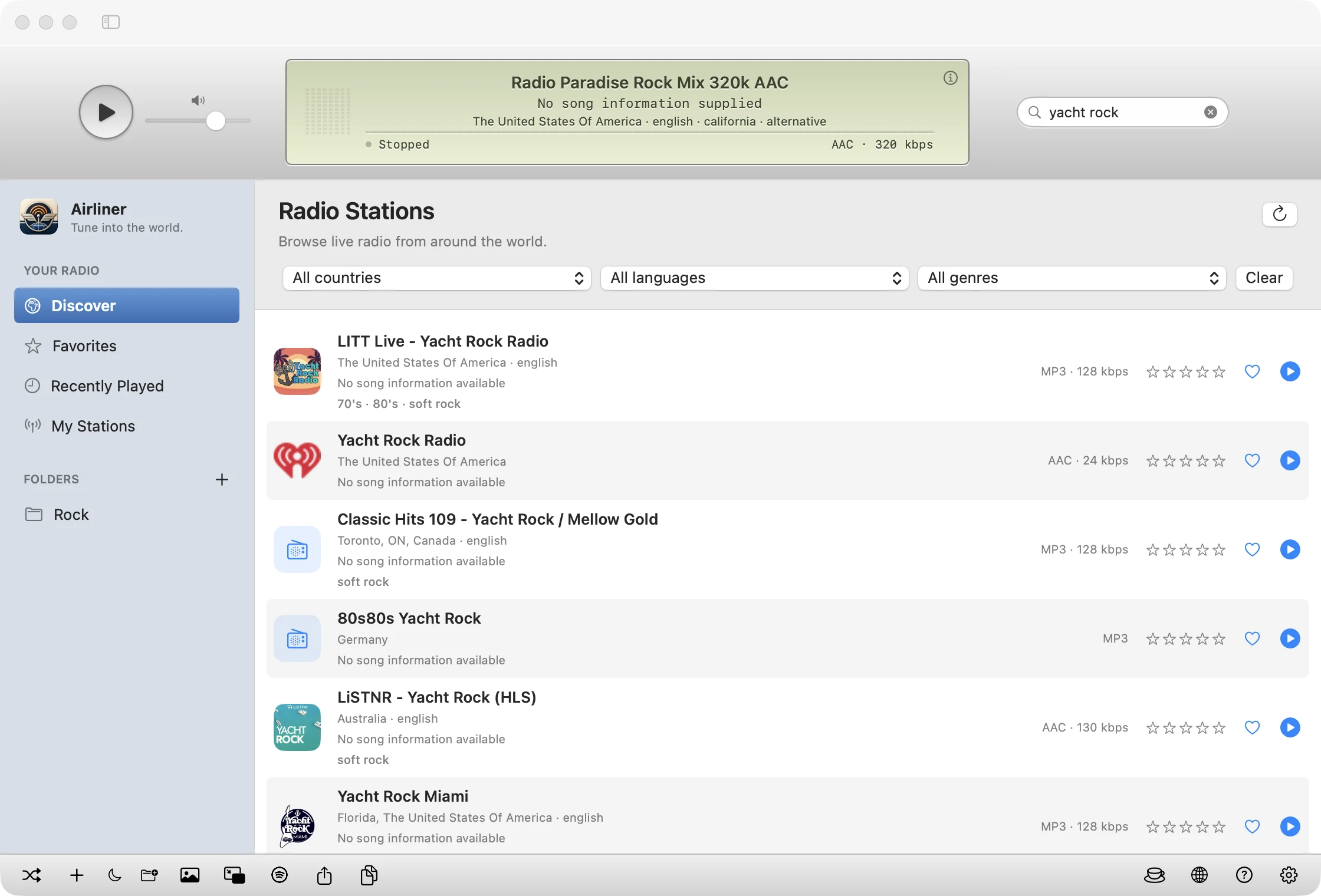
Search by name, country, language and genre across the Radio Browser directory. Narrowing starts instantly on loaded stations while worldwide results load in.
Airliner is a native Mac radio player with a classic silver transport, a sage-green LCD and a spectrum that really follows the music. Discover live stations from every country, keep favorites and folders, and let the world play in the background.
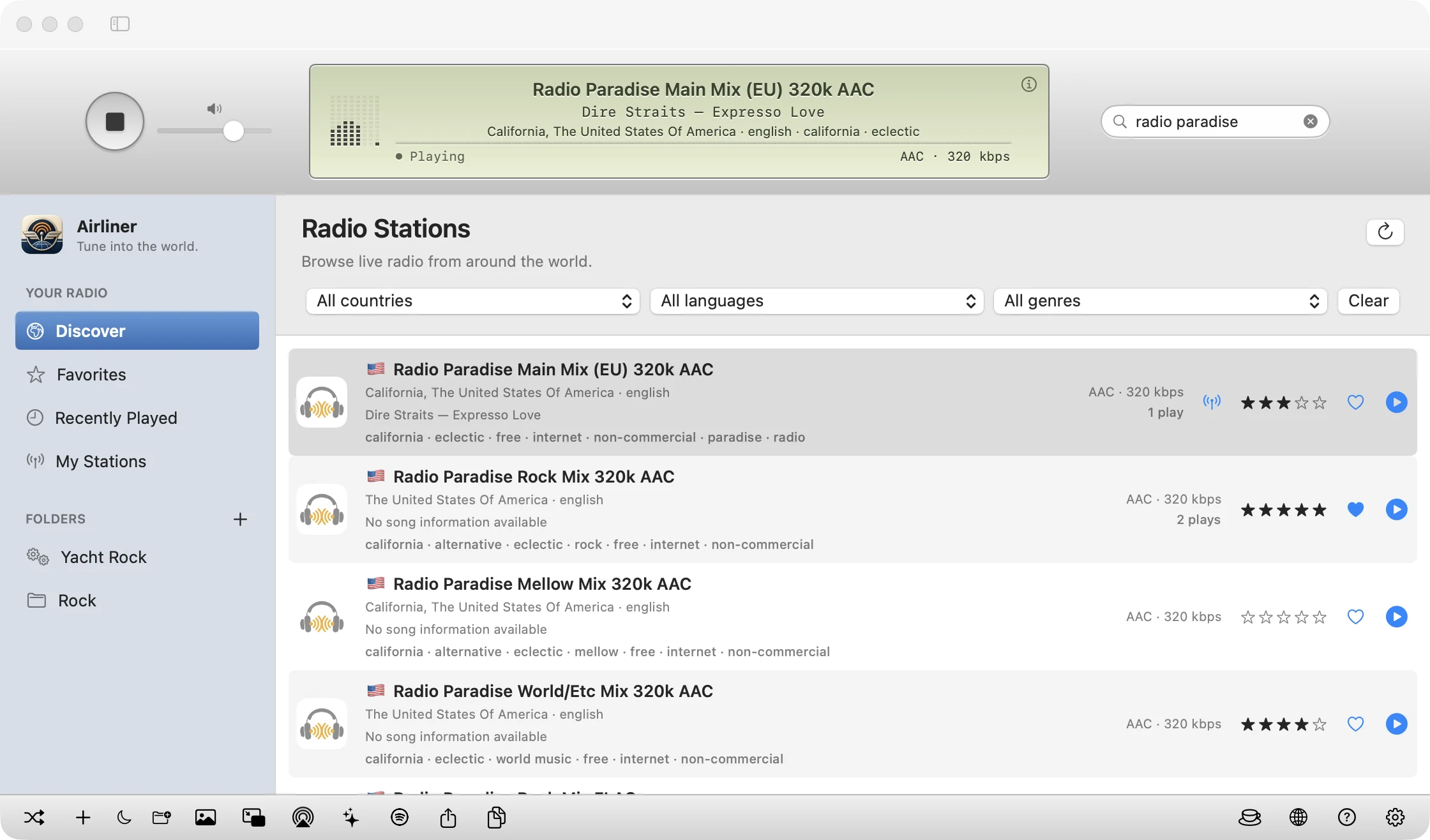
Airliner keeps the familiar music-library layout and adds the things radio listeners actually need: discovery, memory, and control.
Search by name, country, language and genre across the Radio Browser directory. Narrowing starts instantly on loaded stations while worldwide results load in.
A silver transport bar and sage LCD stay at the top of the window, so playback never leaves view as you browse.
A compact eight-bar meter, or click for a full-width 24-band spectrum measured from the actual audio.
Tap the heart on any station to keep it. Recently Played remembers the last 100 stations that really started playing.
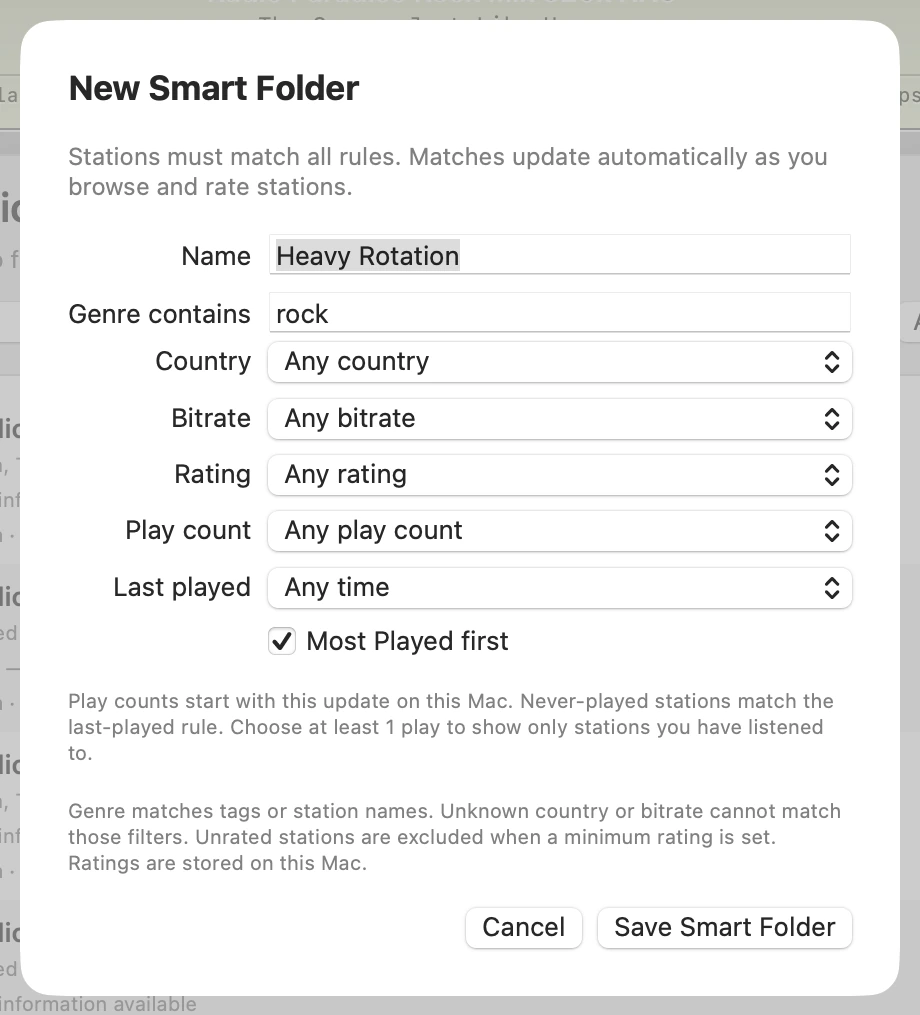
Save rules for genre, country, bitrate, rating, play count and last played, and a folder fills itself as you listen, browse and rate.
Rate stations from one to five stars, right in the list or from the context menu. Ratings are stored only on your Mac.
Control playback from the menu bar with station and song info, Play/Stop, Shuffle and Sleep Timer, even after you close the window.
Optionally see what's playing on stations in the list, using tightly throttled, bounded checks. Off until you enable it in Settings.
Small flags beside station names, with the country name on hover, so you can see where a station broadcasts from at a glance.
Airliner keeps local play counts and last-played dates, shown on station rows with tooltips. They never leave your Mac.
See the time remaining beside the moon button, in the Mini Player and in the menu-bar sleep menu.
Smart Folders match genre tags or station names and combine directory results without duplicates.
Aurora, Spectrum, Orbit, Prism and Cipher Rain fill the main window, all driven by the measured audio from the stream.
Send the radio to AirPlay speakers and receivers from a native picker in the bottom toolbar, with no restart of the stream.
Go full screen with Control-Command-F and let the visuals take over the display.
Visualizers use the existing audio meter and respect your Reduce Motion setting.
Make your own folders in the sidebar and drag stations in. Removing a folder keeps its stations safe in My Stations.
Paste any HTTP or HTTPS stream, M3U, PLS or HLS link and save it alongside the rest of your library.
Artist and title only, from structured tags or ICY metadata, with international names preserved and junk filtered out.
Show cover art in the sidebar when it is available, with an on/off toggle in the bottom bar.
Shrink to a floating window with play/stop, volume, song info and the meter, sharing the same live stream.
Fall asleep to the radio. Choose 15, 30, 60 or 90 minutes, watch the countdown, and Airliner stops on schedule.
Hear something you love? One click opens a Spotify search for the current song so you can save it.
Share a station through the macOS share sheet, or copy its details or stream URL in one click.
Works with macOS media controls and Now Playing, with the cleaned artist and title.
A 22-second connection deadline, two automatic retries, and reconnects when your network returns.
Native macOS controls that follow your appearance, with the LCD tuned for both modes.
No account, no telemetry, no location permission, no recording. Your library lives on your Mac.
Type a station name in the capsule search field and Airliner narrows what's already loaded while it fetches worldwide results. Combine country, language and genre filters to find exactly what you want: Brazilian jazz, German news, Japanese city pop, or a college station an hour from home.
The pale sage LCD is the heart of Airliner. It keeps the broadcaster, the song and the connection status together, and it responds to a click.

Broadcaster name, cleaned artist and title, location, language and genre, plus status and the stream's codec and bitrate. The inset info button opens full station details. Missing fields are simply left out; nothing is made up.

Click the LCD for a full-width, 24-band segmented spectrum, a nod to classic iTunes. It measures the decoded audio Airliner is actually playing, and your choice is remembered next time you launch.
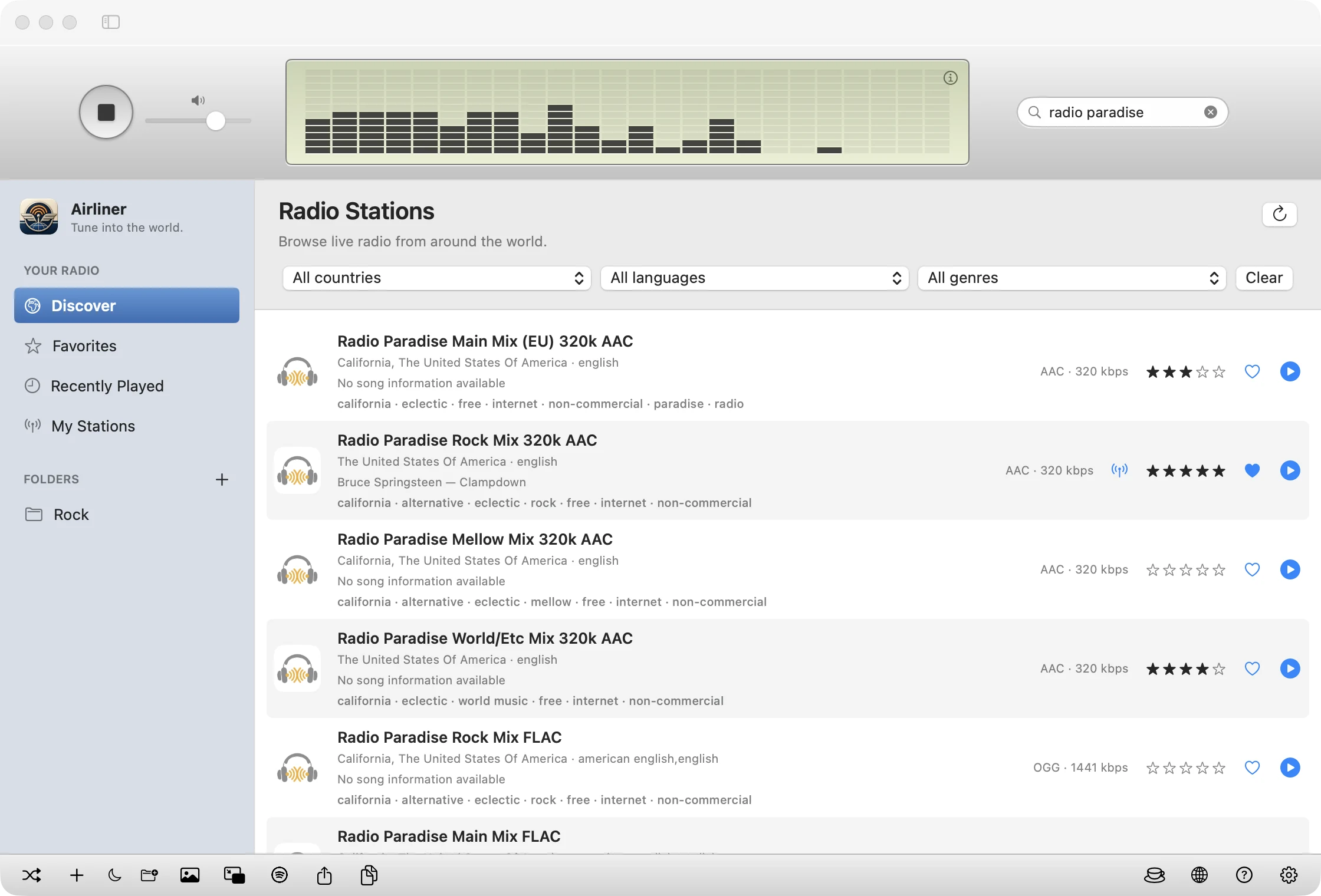
The blue-gray sidebar organizes your radio the way the Music app organizes songs: Discover, Favorites, Recently Played and My Stations, with your own Folders underneath.
Airliner 1.6.3 turns the main window into a light show, and the 1.6.2 update brought AirPlay output.
Three new full-window visualizers: glowing tilted rings with satellite trails, layered kaleidoscope petals, and falling geometric glyphs with emerald trails. Quiet passages stay visible with richer glow.
Luminous ribbons and reflected audio bars, toggled with the sparkle button or Command-T. Choose among all five with the style picker.
A native AirPlay output button in the bottom toolbar, using the existing radio player.
A brief checkmark and clipboard confirmation when you copy the current station, or an error if copying fails.
Earlier: country flags, play-count Smart Folders and sleep countdown (1.6.1); the menu-bar player, star ratings and optional song previews (1.6.0). Read all release notes on GitHub →
Click the sparkle button in the bottom toolbar, or press ⌘T, and the station list gives way to a full-window visualizer. Pick a style, go full screen with ⌃⌘F, and click a sidebar item or press ⌘T again to get back to your stations.
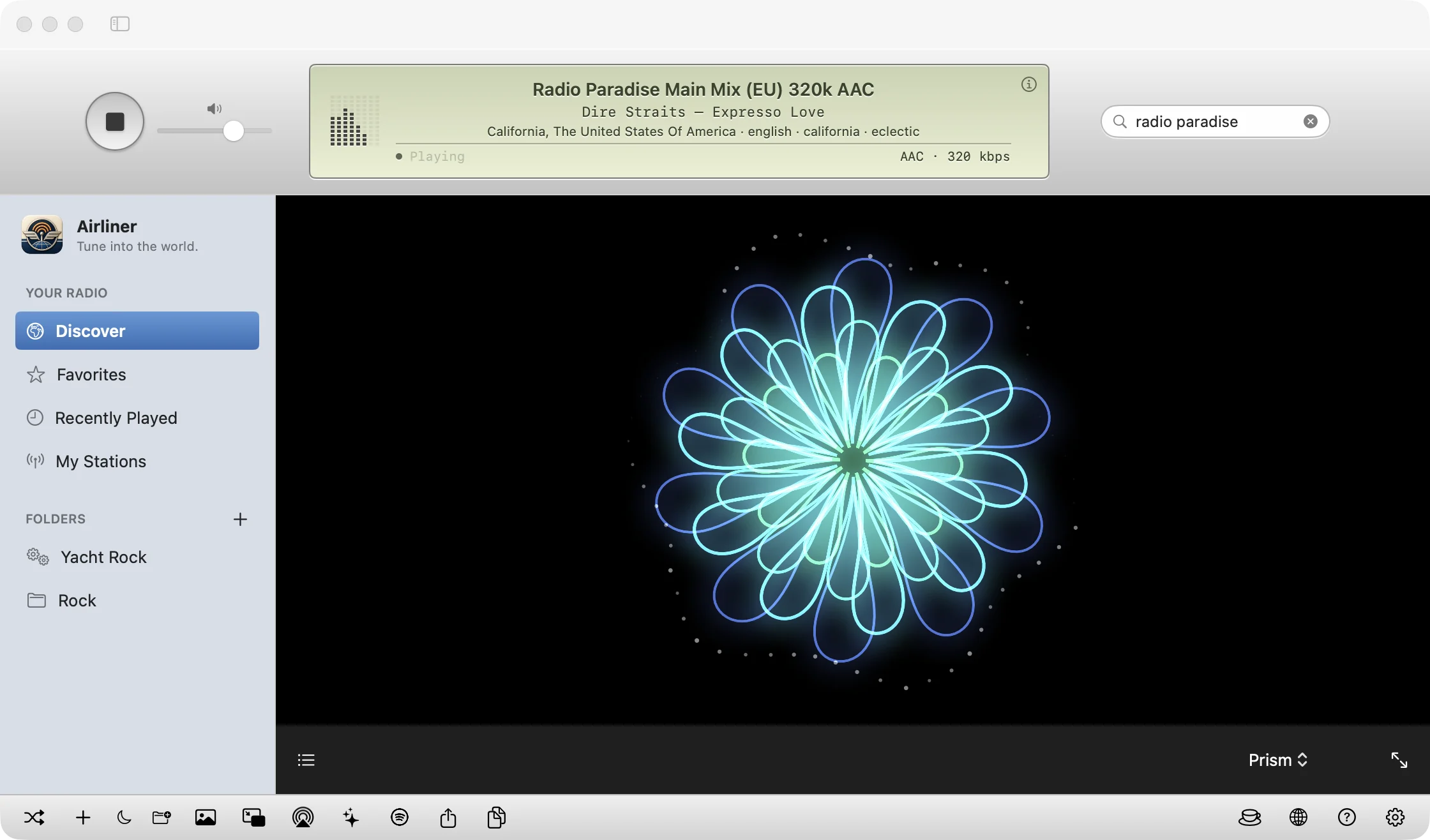

Luminous ribbons that swell and shift with the music.

Reflected audio bars, the classic analyzer with a glow.

Glowing tilted rings, satellite trails and a center that pulses with the beat.

Mirrored kaleidoscope petals in shifting color, crowned with particles.

A full field of original falling glyphs with emerald trails and glowing tips.
Every style follows the radio's actual audio meter rather than canned motion, and respects Reduce Motion. Measurement stays on your Mac: nothing is recorded or sent anywhere.
Rate the stations you love, then build a Smart Folder from rules: genre tags or station names, a country, a minimum bitrate, a minimum rating, a minimum play count and even how long it's been since you last listened. Stations must match every rule, and the folder updates as you listen, browse and rate.
The menu-bar player shows the current station and song with Play/Stop, Shuffle Station and Sleep Timer controls. Show Airliner brings the browser back, including from the Mini Player. Playback continues while the browser is hidden or closed, until you choose Quit Airliner.
Want to know what's on before you tune in? Turn on optional song previews in Settings and rows show the current song when a station supplies it, or “No song information available.” Checks run one at a time, at most six starts per minute, and use a little extra data, so they are off by default.
Get the signed, notarized disk image and drag Airliner into Applications.
Open Discover, search a name, or filter by country, language and genre.
Click the blue play button. The LCD shows the station, the song and the spectrum.
Heart your favorites, rate stations, file them into folders, set a sleep timer or open the Mini Player.
A full-width silver utility bar keeps secondary controls close without crowding the player.

| Button | What it does |
|---|---|
| Shuffle | Take Me Somewhere: a random station |
| + | Add your own station |
| Moon | Sleep timer, with the end time shown |
| Folder | File the current station into a folder |
| Picture | Show or hide album artwork |
| Mini Player | Float a compact player above other windows |
| Spotify | Find the current song on Spotify |
| Share / Copy | Share a station or copy its details |
| AirPlay | Choose an AirPlay speaker or receiver |
| Sparkle | Show the visualizer |
| Coffee cup | Support Airliner with a tip (optional) |
| Globe, ?, gear | Radio Browser, Help and Settings |
Airliner is a proper Mac citizen: every icon has an accessibility label, the list is fully keyboard navigable, and macOS media keys start and stop playback.
| Action | Shortcut |
|---|---|
| Play / stop current station | ⌘P |
| Play or select a station in the list | Space |
| Take Me Somewhere (random station) | ⇧⌘R |
| Add a station | ⇧⌘N |
| New folder | ⌥⌘N |
| Show or hide the visualizer | ⌘T |
| Full-screen visualizer | ⌃⌘F |
| New Smart Folder | File menu |
| Shuffle to a random station (media key) | Next Track |
| Airliner Help | ⌘? |
Park a station in the LCD and keep the window small, or float the Mini Player in a corner while you focus.
Explore the globe: local news from another continent, regional folk, jazz from a city you've never visited.
Pick a sleep timer and your favorite mellow station. Airliner stops on its own.
Filter by language and country to find talk radio in the language you're studying.
There is no login, no analytics, no telemetry service, no location permission and no recording. Your favorites, history and folders stay on your Mac. Station artwork and streams connect directly to broadcaster servers, and the directory only learns that a station was played so its popularity stays honest.
Developer ID signed with hardened runtime.
Checked and stapled by Apple. Opens like any Mac app.
Signed update feed and signed archives, verified before install.
Built for macOS 14 or newer. Follows light, dark and system appearance.
One universal app, about 5 MB to download.
MP3, AAC and HLS, plus M3U and PLS playlists, via macOS's built-in engine.
Airliner is a free, native internet radio player for Mac. It lets you search tens of thousands of live radio stations from around the world, play them in a classic iTunes-style window with a sage-green LCD display, and keep your own favorites, folders and listening history. It is built for macOS 14 Sonoma or newer and runs natively on both Apple silicon and Intel Macs.
Yes. You can download and use Airliner without a payment, account, subscription, ads or trial period. If you enjoy it, you can support development by buying the developer a coffee. Tips are entirely optional and do not unlock anything. There is also a coffee-cup button in the app's toolbar and the Airliner menu.
Airliner uses Radio Browser, a community-maintained, open directory of internet radio stations. Search by station name, country, language and genre. Results show up to 200 healthy stations ordered by popularity and are cached for five minutes. Because the directory is community-run, a few entries may be out of date, and each broadcaster controls its own stream, branding and availability.
Airliner uses macOS's built-in playback engine, so MP3, AAC and HLS streams work. Simple M3U and PLS playlist links are resolved automatically. Some unusual codecs, protected streams and website-only players cannot be played, and Ogg streams may not work.
Yes. Choose File → Add Station (Shift-Command-N), enter a name and a direct HTTP or HTTPS stream URL, an M3U or PLS link, or an HLS playlist. Manual stations are saved in My Stations and can be favorited, filed into folders and played like any other.
When a station broadcasts song information, the LCD shows the cleaned artist and title, and the sidebar can show album artwork. Airliner ignores unrelated metadata such as notices and URLs, keeps international names intact, and never invents a track: if a station supplies no song information, you see the station details instead.
Airliner includes five full-window visualizers: Aurora (luminous ribbons), Spectrum (reflected audio bars), Orbit (glowing tilted rings and satellites), Prism (mirrored kaleidoscope petals) and Cipher Rain (falling geometric glyphs with emerald trails). Click the sparkle button in the bottom toolbar or press Command-T to show one, choose a style from the picker, and press Control-Command-F for full screen. They follow the radio's measured audio level, respect Reduce Motion, and run entirely on your Mac.
Yes. The AirPlay button in the bottom toolbar opens the native macOS output picker, so you can send the live stream to AirPlay speakers and receivers without restarting playback.
The sage-green LCD at the top of the window shows a miniature eight-bar audio meter. Click the LCD to switch to a full-width, 24-band segmented spectrum, and click again to return. The bars measure Airliner's own playback audio, locally, and do not change the sound. With Reduce Motion enabled, the bars still follow measured audio.
On macOS 14.2 through 26, Airliner measures only its own playback with a private audio tap to animate the spectrum. That audio stays on your Mac, is never saved to disk and is never transmitted. If you decline, playback still works; only the animated meter stays idle. macOS 27 uses a different method that doesn't need the permission.
No. Airliner is a listening app. It does not record, save or redistribute streams.
No accounts, no analytics, no telemetry and no location permission. Your favorites, history, folders and manual stations are stored locally on your Mac. Airliner connects to the Radio Browser directory to find stations (and, only if you enable song previews, makes occasional metadata checks to stations in view), reports a listen click to the directory after playback starts, and connects directly to broadcasters' servers to play audio and load station artwork. See the privacy page for details.
Folders appear in the sidebar so you can organize stations your way: Rock, Morning, Jazz, Road Trip. Create one with the + beside Folders or File → New Folder (Option-Command-N), then drag stations onto it or right-click a station and choose Move to Folder. Removing a folder never deletes its stations.
Smart Folders are folders that fill themselves from rules. Choose File → New Smart Folder and set a genre (matched against genre tags or station names), country, minimum bitrate, minimum star rating, minimum play count, and a not-played-in-the-last-N-days rule, with an option to show the Most Played first. Stations must match all rules. Smart Folders combine up to 200 directory results with your saved and rated stations, never move stations out of regular folders, and can be edited or removed from their right-click menu.
Click the five-star rating beside any station, or use its right-click Rating menu. Click the current rating again to clear it. Ratings are stored only on your Mac and can be used as a rule in Smart Folders. Favorites use the heart button and are separate from ratings.
Only on your own Mac. Since version 1.6.1, Airliner keeps local play counts and last-played dates so station rows can show how often you've played them and Smart Folders can use them. Nothing is uploaded, and there is no account. Play counts start from the update onward.
Yes. The menu-bar player shows the current station, song and playback state, with Play/Stop, Shuffle Station and Sleep Timer controls. Show Airliner brings the browser window back. Playback continues while the window is hidden or closed; choose Quit Airliner to end the app. The Next Track media key shuffles to a random station.
An optional setting. When enabled, Airliner makes short HTTPS metadata checks for the visible station rows while the browser is active, so rows can show the current song. Checks run one at a time and at most six start per minute, snapshots expire after two minutes, and unavailable feeds wait ten minutes before another attempt. They use a little extra data and may briefly count as a listener at the broadcaster. Station metadata can be inaccurate, and rows without usable metadata say no song information is available.
The Mini Player turns Airliner into a small floating window with play/stop, volume, song information and the EQ meter. It shares the same live stream, so playback never restarts when you switch, and an expand button takes you back to the full window.
Yes. When a station supplies artist and title, the Find on Spotify button in the bottom bar opens a Spotify search for that song so you can save it. Airliner does not connect to your Spotify account.
Yes. Choose 15, 30, 60 or 90 minutes from the bottom bar or the Playback menu. The remaining time appears beside the moon button, in the Mini Player and in the menu-bar sleep menu, and the timer keeps running if you change stations.
Airliner is signed with an Apple Developer ID, notarized by Apple, and updates itself through the Sparkle framework, which verifies signatures before installing anything. You can turn automatic checking and downloading on or off in Settings, or choose Airliner → Check for Updates.
macOS 14 Sonoma or newer, on Apple silicon and Intel Macs, as a universal app. It follows the system light or dark appearance, and you can override it in Settings.
Airliner waits up to 22 seconds and retries twice automatically. If it still fails, the station's URL may have changed, it may restrict listening by region, or its format may be unsupported. Try another station, or add the broadcaster's updated stream URL as a manual station.
Airliner is free to download and use, with no ads, accounts or subscriptions. If it brightens your day, a small tip helps fund continued development and keeps the radio on.